





Do BUZUD CGMs Support Calibration?
BUZUD Continuous Glucose Monitoring systems (CGMs) support manual calibration, but in most cases, calibration is not required for accurate performance. Our systems are designed to provide a seamless experience without the need for fingerstick calibration. Manual calibration is available as an optional feature.
When Should You Consider Calibration?
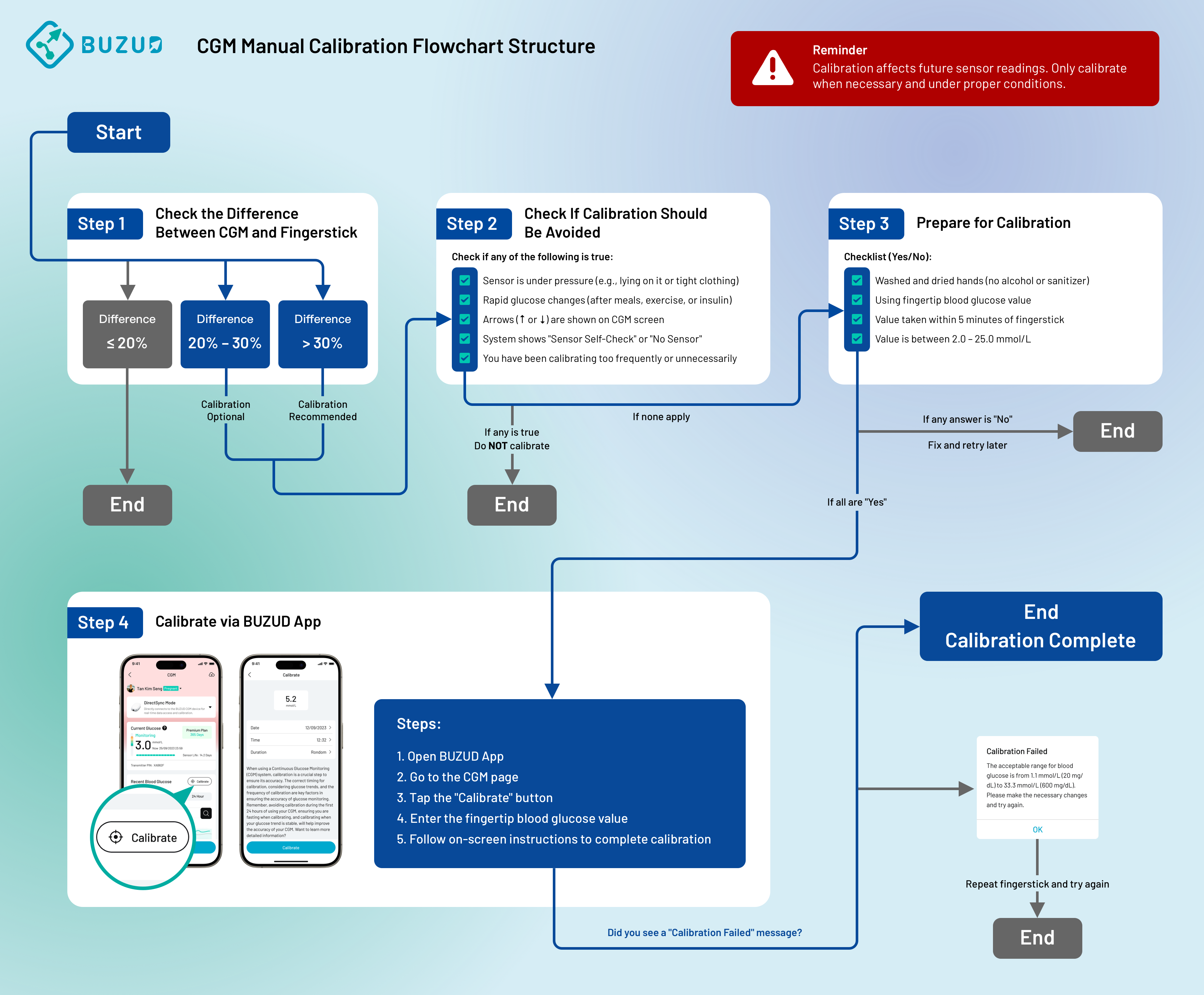
- If your BUZUD CGM reading differs from a fingerstick blood glucose value by less than 20%, this is considered within the normal range.
- If the difference falls between 20% and 30%, manual calibration may improve accuracy.
- Note: Once you initiate manual calibration, the system will continuously adjust future readings based on your input.
When Should Calibration Be Avoided?
To ensure system stability and avoid potential malfunctions, do not calibrate in the following situations. Incorrect calibration can significantly reduce CGM accuracy and may even result in reading failures or device damage:
-
When the Sensor Is Under Pressure
If the sensor site is being compressed by clothing, body position, or external force, glucose values may be temporarily inaccurate. Calibrating under these conditions may cause the system to adjust based on incorrect data, leading to long-term inaccuracy or damage to internal algorithms. -
During Rapid Glucose Changes
After meals, during exercise, or following insulin injections, blood glucose levels may change rapidly. CGM readings have a physiological delay. Calibrating at these times can mislead the system into learning inaccurate trends, potentially causing persistent data distortion or sensor malfunction. -
When Up or Down Arrows Are Displayed
Arrows indicate rapid glucose movement and an unstable state. Calibrating during these moments may result in system errors or device lock-up due to the sensor's inability to reconcile the trend. -
During Sensor Error Messages
If the system shows "Sensor self-check" or "No sensor," do not calibrate. The sensor is not in a stable data collection state, and forcing a calibration may corrupt internal calibration parameters or require premature sensor replacement. -
Frequent or Unnecessary Calibration
BUZUD CGMs are designed with automated calibration mechanisms. Excessive manual input may disrupt internal algorithms, leading to erratic glucose curves, false alerts, or incorrect readings. Only calibrate when absolutely necessary, and preferably under guidance from a healthcare professional.
Things to Know Before Calibrating:
- Wash and dry your hands with soap and water before testing. Avoid alcohol wipes or hand sanitizer, as they may interfere with accuracy.
- Enter the value within 5 minutes of fingerstick testing to ensure the reading reflects your current glucose level.
- Only use fingertip blood glucose values. Alternate sites (e.g., forearm) may yield inaccurate results.
- Acceptable calibration values range from 2.0 to 25.0 mmol/L. Values outside this range will not be accepted.
- If you receive a "Calibration Failed" message, repeat the fingerstick and try calibrating again.
How to Calibrate Your BUZUD CGM
Using the BUZUD App (for models that support calibration):
- Open the BUZUD App and go to the CGM page.
- Tap the "Calibrate" button on the screen.
- Enter the blood glucose value from your fingertip test and follow the on-screen instructions to complete calibration.
BUZUD CGMs are built to deliver a convenient and accurate glucose monitoring experience. Unless necessary, we recommend relying on automatic sensor readings without frequent manual adjustments. For any questions, please contact BUZUD support or consult a healthcare professional.