



How to Share Your Health Data with Your Doctor?
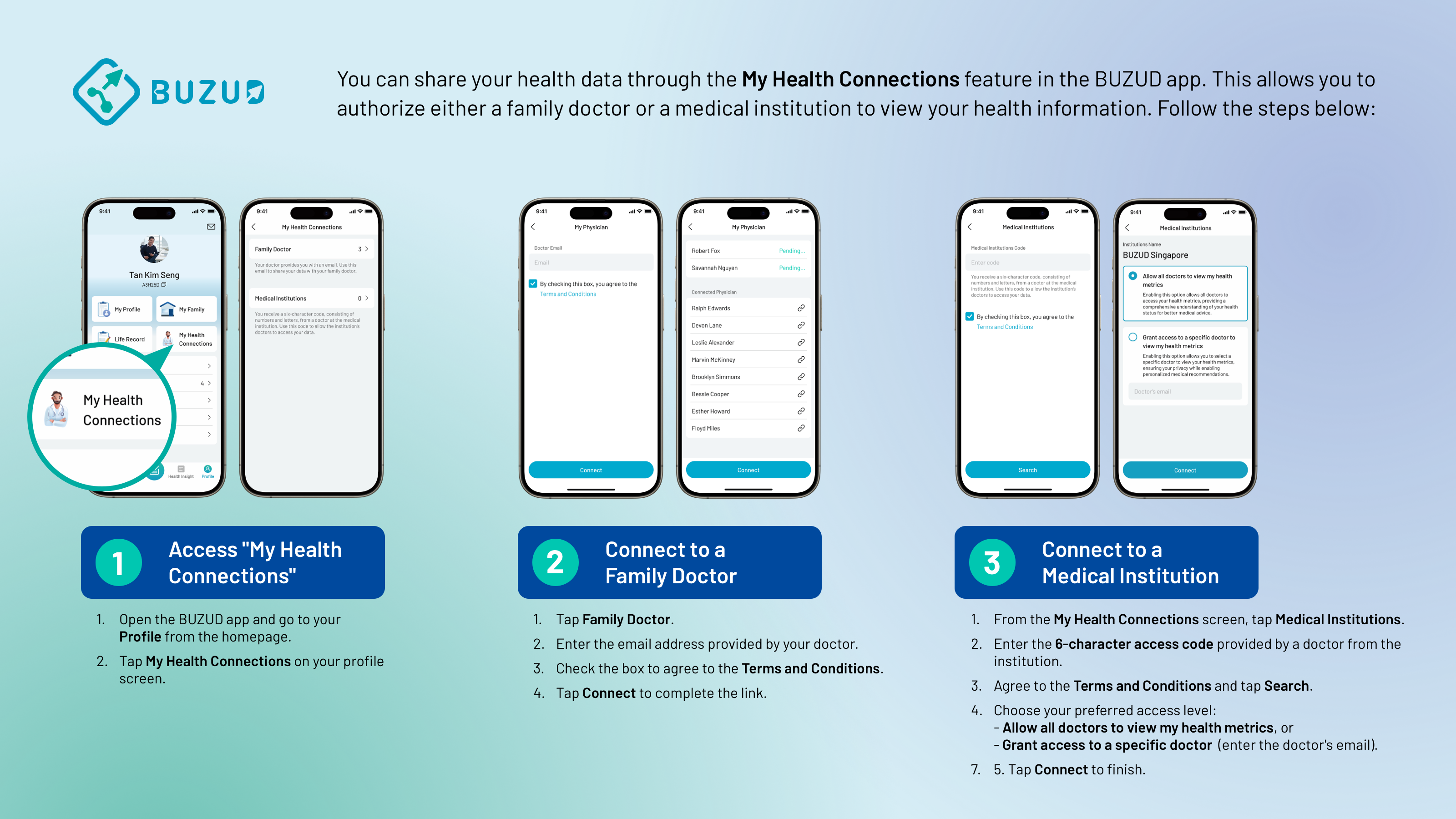
You can share your health data through the "My Health Connections" feature in the BUZUD app. This allows you to authorize either a family doctor or a medical institution to view your health information. Follow the steps below:
1. Access "My Health Connections"
- Open the BUZUD app and go to your Profile from the homepage.
- Tap "My Health Connections" on your profile screen.
2. Connect to a Family Doctor
- Tap "Family Doctor".
- Enter the email address provided by your doctor.
- Check the box to agree to the Terms and Conditions.
- Tap "Connect" to complete the link.
3. Connect to a Medical Institution
- From the "My Health Connections" screen, tap "Medical Institutions".
- Enter the 6-character access code provided by a doctor from the institution.
- Agree to the Terms and Conditions and tap "Search".
- Choose your preferred access level:
- Allow all doctors to view my health metrics, or
- Grant access to a specific doctor (enter the doctor’s email).
- Tap "Connect" to finish.
Once connected, you can view and manage your linked doctors or institutions from the list.