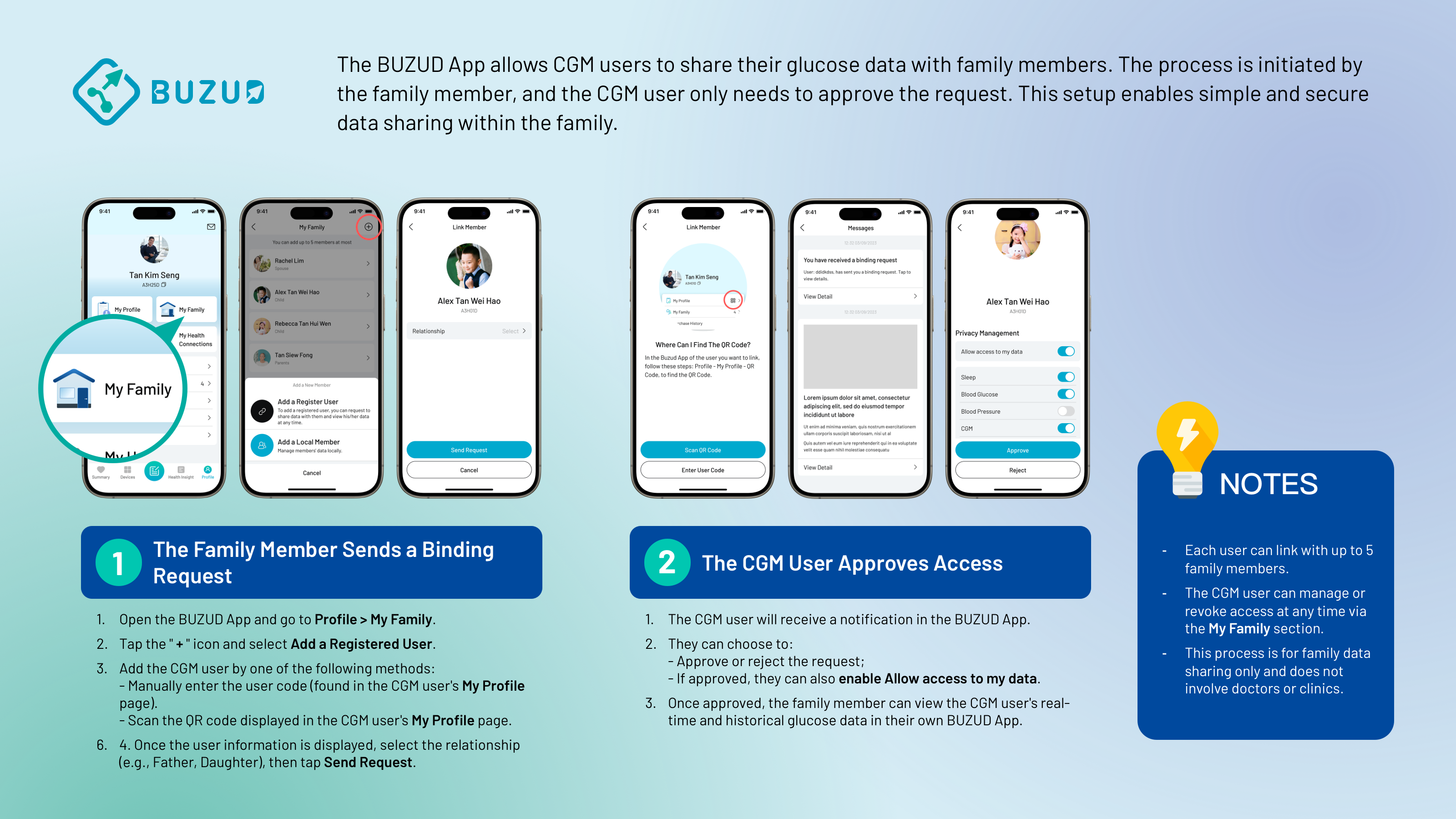




How Can a Family Member View the Glucose Data from a BUZUD CGM User?
The BUZUD App allows CGM users to share their glucose data with family members. The process is initiated by the family member, and the CGM user only needs to approve the request. This setup enables simple and secure data sharing within the family.
Step 1: The Family Member Sends a Binding Request
- Open the BUZUD App and go to
Profile > My Family. - Tap the "+" icon and select "Add a Registered User".
- Add the CGM user by one of the following methods:
- Manually enter the user code (found in the CGM user's
My Profilepage). - Scan the QR code displayed in the CGM user's
My Profilepage.
- Manually enter the user code (found in the CGM user's
- Once the user information is displayed, select the relationship (e.g., Father, Daughter), then tap "Send Request".
Step 2: The CGM User Approves Access
- The CGM user will receive a notification in the BUZUD App.
- They can choose to:
- Approve or reject the request;
- If approved, they can also enable "Allow access to my data".
- Once approved, the family member can view the CGM user's real-time and historical glucose data in their own BUZUD App.
Notes
- Each user can link with up to 5 family members.
- The CGM user can manage or revoke access at any time via the "My Family" section.
- This process is for family data sharing only and does not involve doctors or clinics.